The software packages need to be stored in a central repository as artifacts. The artifacts need to be stored securely. We should be able to publish new artifacts and also needs to share the artifacts across the organization. Amazon provides a managed repository service called AWS CodeArtifact. It works with commonly used package managers and with build tools like Maven, Gradle, npm, pip.
With CodeArtifact there is no software to update or servers to manage. It is completely a part of a serverless stack. We can set up central repositories that make it easy for development teams to find and use the software packages they need. We can control access to the artifacts and validate the software packages. We can do versioning and teams can fetch the latest artifacts from the CodeArtifact.
In this blog, we will see, how to create different components of CodeArtifact using Cloud Development Kit (CDK).
CodeArtifact stores software packages in repositories. Every CodeArtifact repository is a member of a single CodeArtifact domain. We can use one domain for our organization with one or more repositories. Each repository might be used for a different development team. Packages in your repositories can then be discovered and shared across your development teams.
Create a new directory on your system.
mkdir cdk-codeartifact && cd cdk-codeartifact
We will use cdk init to create a new Javascript CDK project:
cdk init --language javascript
The cdk init command creates a number of files and folders inside the cdk-codeartifact directory to help us organize the source code for your AWS CDK app.
We can list the stacks in our app by running the below command. It will show CdkCodeartifactStack.
_$ cdk ls
CdkCodeartifactStack
Let us install the AWS Codeartifact construct library.
npm install @aws-cdk/aws-codeartifact
Edit the file lib\cdk-codeartifact-stack.js to create an AWS Code artifact resource as shown below.
const cdk = require("@aws-cdk/core");
const codeartifact = require("@aws-cdk/aws-codeartifact");

class CdkCodeartifactStack extends cdk.Stack {
  /**
   *
   * @param {cdk.Construct} scope
   * @param {string} id
   * @param {cdk.StackProps=} props
   */
  constructor(scope, id) {
    super(scope, id);

    // Create a Domain
    const domain = new codeartifact.CfnDomain(this, "CodeArtifactDomain", {
      domainName: "sample-domain",
    });

    // Create a public repository
    const publicSampleRepo = new codeartifact.CfnRepository(
      this,
      "PublicSampleRepository",
      {
        repositoryName: "public-npm-store",
        externalConnections: ["public:npmjs"],
        domainName: domain.domainName,
      }
    );

    publicSampleRepo.addDependsOn(domain);

    // Create a custom repository
    const customSampleRepo = new codeartifact.CfnRepository(
      this,
      "CustomSampleRepository",
      {
        repositoryName: "custom-repository-store",
        upstreams: [publicSampleRepo.repositoryName],
        domainName: domain.domainName,
      }
    );
    customSampleRepo.addDependsOn(publicSampleRepo);
  }
}

module.exports = { CdkCodeartifactStack };
- Create a Domain sample-domain.
- Create a public repository public-npm-store and connect it with an external public npm registry.
- The public repository is dependent on the domain which is achieved by using methods addDependsOn.
- Create one more custom repository custom-repository-store and it can have the same dependency as a public repository by using the upstreams property which points to the public repository.
Before deploying the AWS resource, we can take a look at what resources will be getting created by using the below command.
cdk diff

NOTE: If we have multiple profiles set in our system, we need to tell CDK to look into the particular profile. This can be done, by adding the below key-value in cdk.json which was generated when we created a CDK project.
"profile": "<YOUR_PROFILE_NAME>"
Now, once we are ok with the resources which will be created, we can deploy them using the below command
cdk deploy
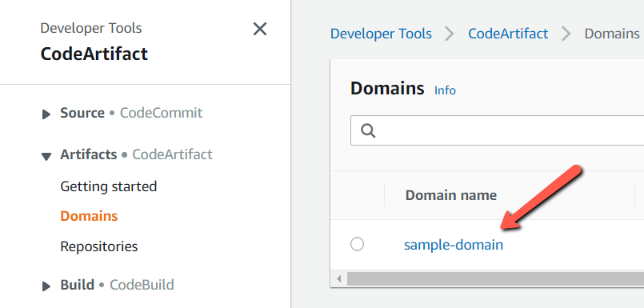
Let us open the AWS Lambda console. We can see that the domain has been created.
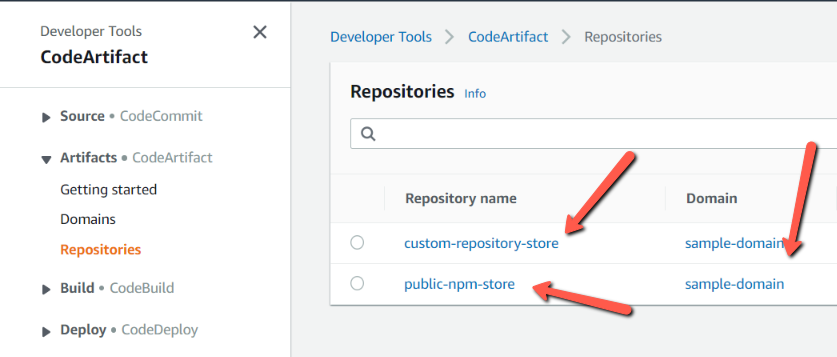
Also, we can see two repositories are created and are connected to one domain.
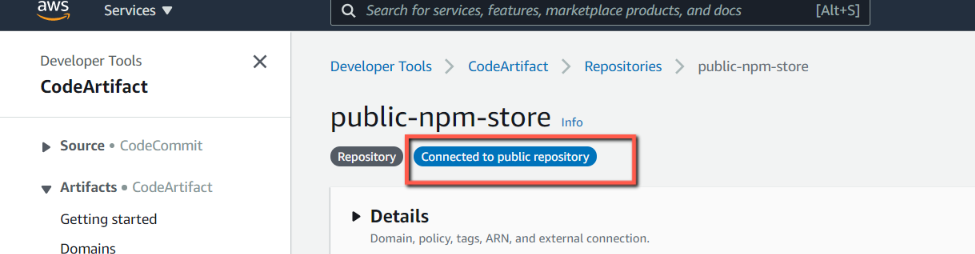
We can also see that our public-npm-store repository is connected to the public npm repository.
Conclusion
In this blog, we used the Aws managed CodeArtifact service. We saw how to create a domain and the repositories inside the domain.
Github Repository: https://github.com/rahulmlokurte/aws-usage/tree/main/aws-cdk/cdk-codeartifact
About the author
I am a Lead Engineer from India. Love to blog about serverless and help teams design and develop serverless architecture. An AWS cloud practitioner. Blogs about AWS Services utilising AWS CDK, CloudFormation, Terraform.
Comments
Join the discussionNo comments yet. Be the first to comment.
AWS Cloud Development Kit
This series will cover provisioning Aws resources using Cloud Development Kit.