Infrastructure as code has become a go-to process to automatically provision and manage cloud resources. AWS provides two options for infrastructure as code.
- AWS CloudFormation
- AWS Cloud Development Kit
With CloudFormation, we have to write a lot of YAML templates or JSON files. As AWS adds more services, we have to add more files to CloudFormation. It becomes difficult to work with lots of files. YAML/JSON is based on data serialization and not an actual programming language. The AWS CDK will overcome the limitations of cloud formation by enabling the reuse of code and proper testing.
AWS CDK is a framework that allows developers to use familiar programming languages to define AWS cloud infrastructure and provision it. CDK provides the Constructs cloud component that cover many of the AWS services and features. It helps us to define our application infrastructure at high level.
we will create a Lambda Function and the infrastructure around lambda function using AWS CDK.
Create a new directory on your system.
mkdir cdk-greetapp && cd cdk-greetapp
We will use cdk init to create a new Javascript CDK project:
cdk init --language javascript
The cdk init command creates a number of files and folders inside the cdk-greetapp directory to help us organize the source code for your AWS CDK app.
We can list the stacks in our app by running the below command. It will show CdkGreetappStack.
_$ cdk ls
CdkGreetappStack
Let us install AWS lambda construct library.
npm install @aws-cdk/aws-lambda
Edit the file ***lib/cdk-greetapp-stack.js to create an AWS lambda resource as shown below.
const cdk = require("@aws-cdk/core");
const lambda = require("@aws-cdk/aws-lambda");

class CdkGreetappStack extends cdk.Stack {
  /**
   *
   * @param {cdk.Construct} scope
   * @param {string} id
   * @param {cdk.StackProps=} props
   */
  constructor(scope, id, props) {
    super(scope, id, props);
    // defines an AWS Lambda resource
    const greet = new lambda.Function(this, "GreetHandler", {
      runtime: lambda.Runtime.NODEJS_14_X,
      code: lambda.Code.fromAsset("lambda"),
      handler: "greet.handler",
    });
  }
}

module.exports = { CdkGreetappStack };
- Lambda Function uses NodeJS 14.x runtime
- The handler code is loaded from the directory named lambda where we will add the lambda code.
- The name of the handler function is greet.handler where greet is the name of file and handler is exported function name.
Lets create a directory name lambda in root folder and add a file greet.js.
mkdir lambda
cd lambda
touch greet.js
Add the lambda code to greet.js
exports.handler = async function (event) {
  console.log("request:", JSON.stringify(event, undefined, 2));
  let response = {
    statusCode: 200,
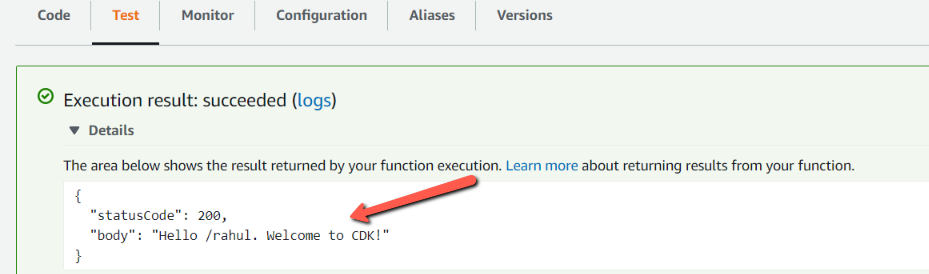
    body: `Hello ${event.path}. Welcome to CDK!`,
  };
  return response;
};
Before deploying the AWS resource, we can take a look on what resources will be getting created by using below command.
cdk diff

NOTE: If we have multiple profiles set in our system, we need to tell cdk to look into particular profile. This can be done, by adding below key-value in cdk.json which was generated when we created a CDK project.
"profile": "<YOUR_PROFILE_NAME>"
Now, once we are ok with the resources which will be created, we can deploy it using below command
cdk deploy
Let us open the AWS Lambda console
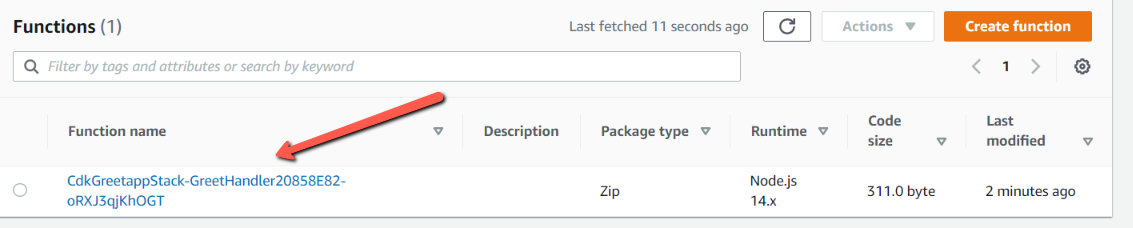
Select Amazon API Gateway AWS Proxy from the Event template list.
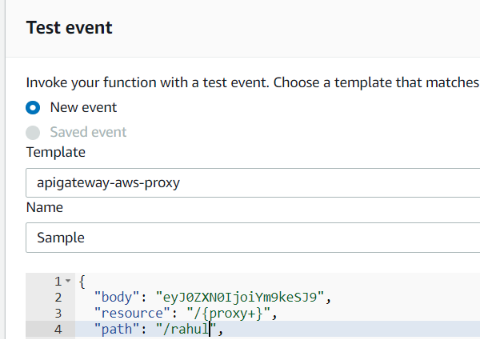
Click on Test, we can see that, we get the proper response as shown below.
Conclusion
we saw how to create a lambda function and also lambda resource by using AWS Cloud Development Kit. We also saw various commands related to CDK for initiating projects, deploying the resources to AWS. The code repository link is here
If you want to do hands-on, I have created a Youtube Video. You can check out here
About the author
I am a Lead Engineer from India. Love to blog about serverless and help teams design and develop serverless architecture. An AWS cloud practitioner. Blogs about AWS Services utilising AWS CDK, CloudFormation, Terraform.
Comments
Join the discussionNo comments yet. Be the first to comment.
AWS Cloud Development Kit
This series will cover provisioning Aws resources using Cloud Development Kit.