Build Serverless Api Using lambda-api

The serverless application can be easily created with AWS lambda and AWS Gateway. We can write a lambda function and configure the gateway. We get a Rest endpoint which we can call to reach the lambda function. This approach is easy but comes with a caveat. We have to configure API gateway, manage the deployments, publish to stages.
In this blog, we will see how to develop and deploy a serverless application using Lambda API, a lightweight framework for developing serverless applications.
Let's create a new project directory.
mkdir serverless-samples
cd serverless-samples
We will initiate the project and Install lambda-api dependency.
npm init
npm install lambda-api
The lambda-api just needs the 3 steps.
- Require the framework and Instantiate it.
- Define a route.
- Declare our Lambda Handler.
Create a new handler.js file and add the below contents.
//----------------------------------------------------------------------------//
// Require the framework
//----------------------------------------------------------------------------//

const app = require("lambda-api")({ version: "v1.0", base: "v1" });

//----------------------------------------------------------------------------//
// Define API routes
//----------------------------------------------------------------------------//

// GET
app.get("/greet/:name", (req, res) => {
  // Send the response
  res.status(200).json({
    //name: req.params,
    status: "ok",
    body: "Hello " + req.params.name,
  });
});

//----------------------------------------------------------------------------//
// Lambda handler
//----------------------------------------------------------------------------//
module.exports.router = (event, context, callback) => {
  context.callbackWaitsForEmptyEventLoop = false;

  // Run the request
  app.run(event, context, callback);
}; // end router handler
In the above code, we have created a GET endpoint with /greet/:name. The Path parameter is name which will be passed to the GET endpoint. The API will return the response with a status code of 200 and the body will greet a person with a name that is passed in the path params. To run the request, we use app.run() method.
Deploy to AWS
Login into AWS and search for Lambda service. Create a new function, provide the name and Runtime as shown below.
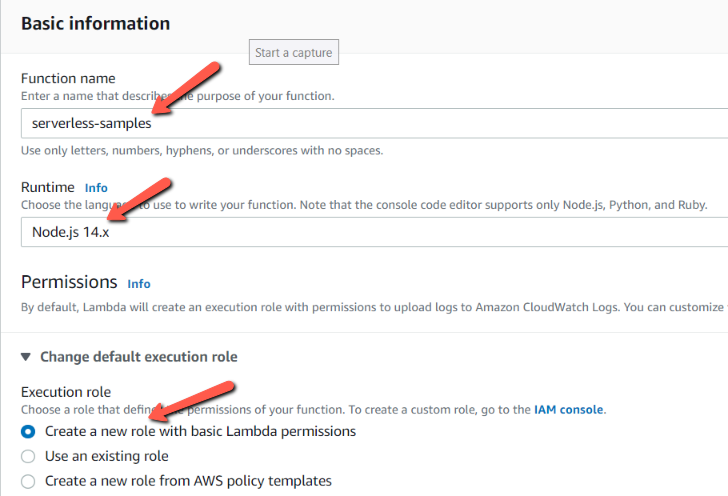
Create a zip file of the project and upload the zip file to function serverless-sample and change the handler to handler.router.

Invoke the function with a test event. We need to choose the template that matches the service that triggers our function or we can also create an event document in JSON.
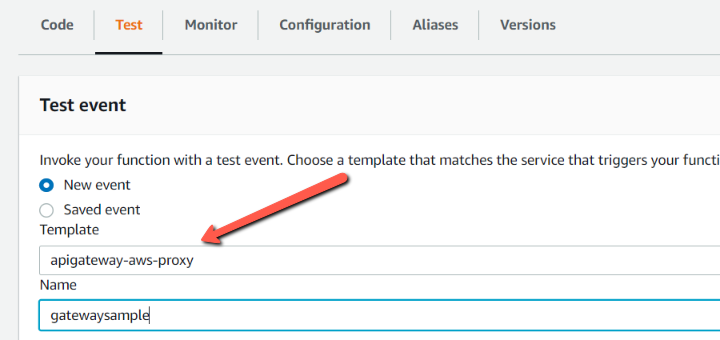
As shown above, we have to select a New event option and select apigateway-aws-proxy template and give a test event name as gatewaysample. We will get a sample event that is compatible with the API gateway.
Now test the endpoint by adding values to the below keys.
- "resource": "/v1/greet/rahul"
- "path": "/v1/greet/rahul"
- "httpMethod": "GET"
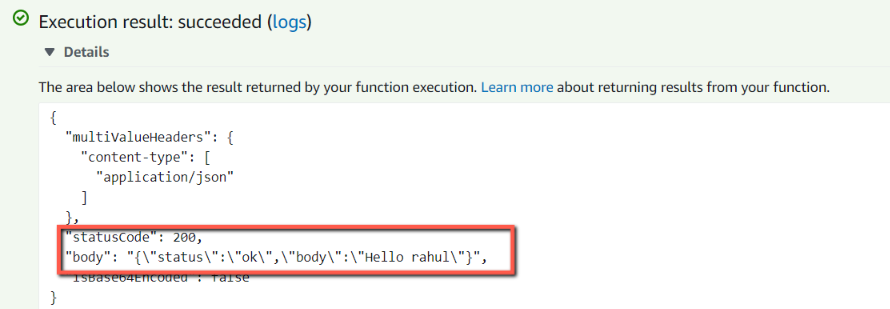
Once configured, click on the Test button, We get the below greeting for the name passed into the function.
About the author
I am a Lead Engineer from India. Love to blog about serverless and help teams design and develop serverless architecture. An AWS cloud practitioner. Blogs about AWS Services utilising AWS CDK, CloudFormation, Terraform.
Comments
Join the discussionNo comments yet. Be the first to comment.